The result is quieter than it sounds. Fewer emails asking "is this done yet?" Fewer jobs sitting idle because nobody knew it was their turn. Managers spend their time on problems instead of chasing updates.
Below, we explain how we break a workflow into parts, how we pick what to automate first and how we handle the cases that do not fit the rules.
How workflow automation works: five parts
Every workflow we automate is built from the same five parts. Naming them makes it easier to see what software can handle and where a person needs to step in.
Take a purchase approval. The trigger is a request over a set limit. The condition is a manager's sign-off. The owner is that manager. Reminders go out each day until it is decided, and the record shows who approved it and when.
When a workflow breaks down in real life, one of these parts is usually missing. The trigger is informal, the conditions live in someone's head or nobody is clearly the owner.
- Trigger: the event that starts the work, such as a form submitted, a contract signed or a status changed
- Conditions: what must be true before the next step, like a document on file or an approval recorded
- Owner: the named person or team responsible for the next step
- Reminders: follow-ups that go out on schedule and stop the moment the task is done
- Close and report: a record of what happened, when and by whom
Which processes to automate first
Good candidates for business process automation share three traits: they happen often, they follow clear rules and they currently rely on someone remembering. We map a few of these with your team, then start where the payoff is clearest.
In a Houston office, the best first workflow automation project is usually the one people complain about every week.
We leave alone the work that depends on judgment, relationships or rare situations. Automating those usually creates more exceptions than it saves.
- New customer or job setup that needs the same information every time
- Approvals that wait in someone's inbox
- Requests for missing documents
- Status updates people currently send by hand
- Handoffs between departments
- 1 Trigger
- 2 Check conditions
- 3 Assign owner
- 4 Remind if waiting
- 5 Close and report
Designing for holds and exceptions
The happy path is easy. The real design work is deciding what happens when something is missing, late or wrong.
A hold keeps an item from moving forward until the right condition exists, and the system says exactly what is missing. A purchase order waits for a manager's approval. A job is not scheduled until the permit is on file.
An exception path sends a problem to a person instead of letting it stall quietly. If a vendor has not confirmed within the agreed window, the job goes to a coordinator with its history attached. Good automation surfaces problems. Bad automation hides them.
Holds also protect your team from mistakes that are expensive to undo, like scheduling a crew before a site is ready or releasing a shipment before payment clears.
✕Approvals wait unseen in someone's inbox
✓Approvals route to the owner with reminders until decided
✕Staff chase missing documents by phone and email
✓Requests go out automatically and stop once documents arrive
✕Work sits idle because nobody knew it was their turn
✓Every step has a named owner the moment it starts
✕Problems stay hidden until a customer complains
✓Exceptions go to a person with the history attached
✕Nobody can explain why a job went where it did
✓Each automated action is logged with its rule and time
Example: a maintenance request from photo to closure
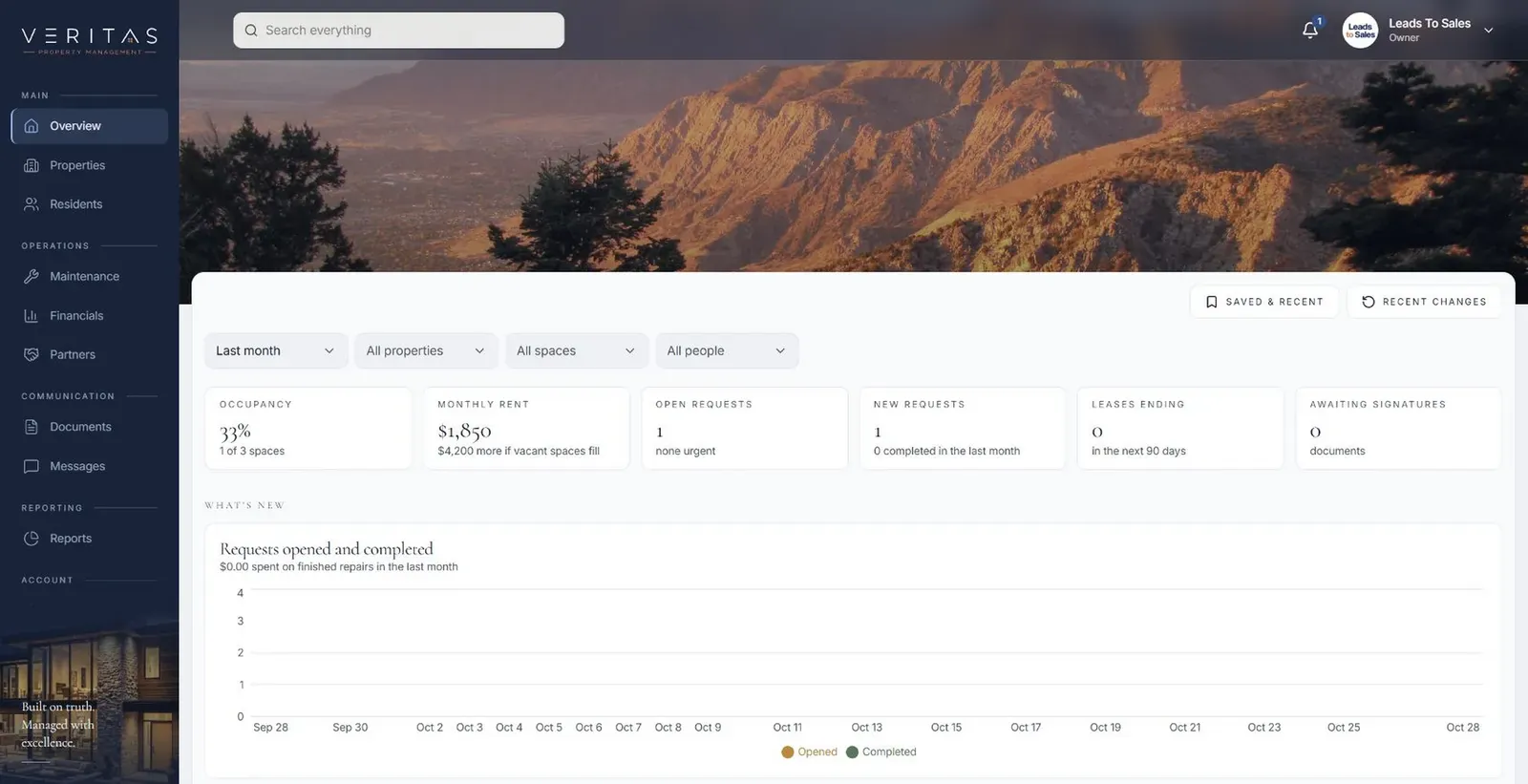
Our Veritas Property Management shows a workflow in motion. A tenant submits a maintenance request with photos through their portal. Staff review it, assign it, post updates and close it, while the tenant and the property owner each see the information meant for them. Tenants stop calling to ask whether anyone saw their request, because the portal already tells them.
Nobody has to forward the photos or remember to tell the owner. Each step hands off to the next with the request's history attached. A proposed next phase would extend the same workflow to vendors.
Automating healthcare administration workflows
Healthcare administration runs on workflows that depend on reminders and memory: intake packets, insurance checks, referral authorizations and reports sent back to referring offices. For Houston practices, healthcare workflow automation can route each item to the right coordinator, chase missing documents and flag overdue referrals.
We build for full HIPAA compliance, with role-based access and audit logs. Clinical decisions stay with clinicians, and automation handles the administrative path around them. For a group with offices across Fort Bend and Montgomery counties, the same rules can apply at every location while each office keeps its own owners and queues.
The system handles
- Routing work to the right person
- Chasing missing information
- Updating everyone who needs to know
Your people decide
- Deciding how to handle exceptions
- Approvals
- Talking to customers
Seeing whether the automation is working
An automated workflow should make waiting visible. Because every step records when it started, who owned it and when it finished, you can see which items are on hold, which reminders are still going out and which exceptions are sitting with a person.
That gives managers a short, honest list each morning: what is stuck, why, and who is handling it. It also shows quickly when a rule is wrong, for example when the same exception keeps appearing, so we can adjust it before people start working around the system.
A short weekly review of those lists, with the people who handle the exceptions, is usually enough to keep the rules honest.
Rules you can read and change
Your processes will change: a new approval limit, a new location, a new document requirement. We build rules so they can be adjusted without a rebuild, and we document each one in plain language so anyone can see why work went where it did.
Every automated action is logged. When someone asks why a job was assigned to them or why an order is on hold, the answer is in the record. Over time, the same logs show where work waits longest, which tells you which workflow to improve next.
That is how workflow automation stays useful for a Houston business as it adds offices in Katy or Pearland, new services or new approval steps.