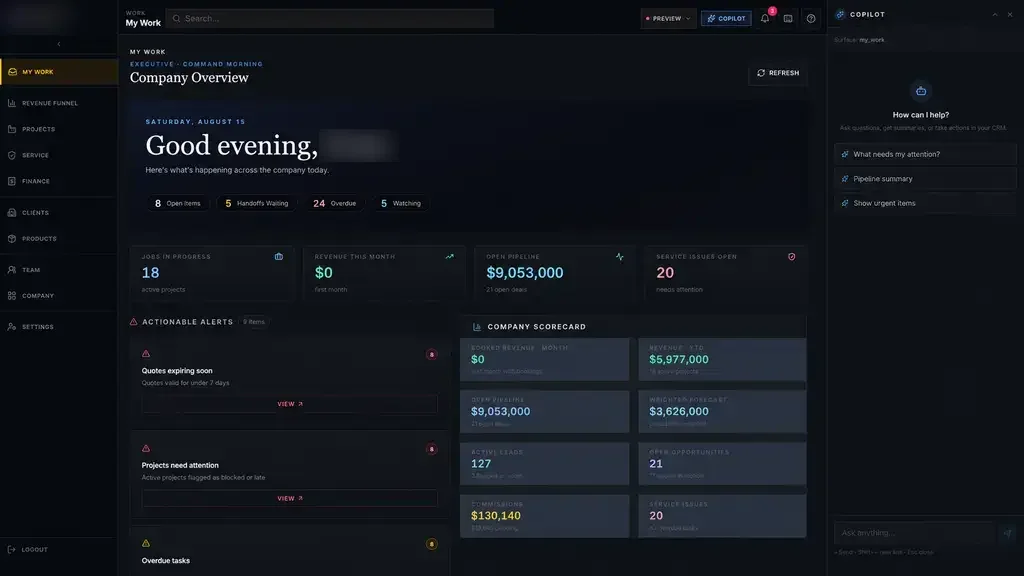
We do not mean a chatbot bolted onto your website or a black box acting on its own. We mean AI that reads an incoming document, answers "where does this stand?" from your own records and prepares the next action for a person to check and send.
If an earlier AI experiment produced an impressive demo and nothing your team trusts day to day, this page explains how we approach it.
Three jobs AI automation does well
Most useful AI work inside a business falls into three jobs. Each one saves time on work people find tedious, and each one stops at the point where judgment is needed.
Reading documents. Forms, PDFs, emails and faxes arrive with the few details that matter buried in pages of text. AI can pull out the customer name, the dates, the reference number or the missing signature, attach them to the right record and show a person what it found, with the source highlighted.
Answering status questions. "Why is this order stuck?" usually takes a phone call and three systems. When AI can see your records, it answers from them: the job is waiting on a permit, the referral is missing an authorization, the material shipment is late.
Drafting the next action. AI prepares the follow-up email, the summary for a manager or the update to a customer. A person reads it, edits it if needed and sends it.
People approve what matters
Every AI feature we build draws a clear line between what the software prepares and what a person decides. Anything that leaves your building, involves money or needs expertise goes through review.
In practice, suggestions appear as drafts, extracted details appear as proposed values next to their source, and the system records who accepted or changed them. Your team gets faster without losing the ability to say no.
That review step is what makes AI automation workable in a Houston office that handles invoices, contracts or patient paperwork.
In healthcare administration, clinical decisions stay with clinicians. AI can sort a referral packet or flag a missing document. It does not make care decisions.
- AI prepares: extracted details, summaries, drafts and suggested next steps
- People decide: approvals, pricing, professional and clinical judgment, anything sent outside
- The system records: what was suggested, who reviewed it and what changed
- 1 Information arrives
- 2 AI reads and sorts it
- 3 Person reviews
- 4 System records the decision
- 5 Next step starts
Data and privacy boundaries
Before we connect AI to anything, we agree with you on what it can see. Those rules are written down and built into the software, rather than left to good intentions.
These rules matter more as the system grows. A tool that starts by reading one form type may later answer questions across many records, so we revisit the boundaries each time AI gets access to something new.
- AI works inside the permissions of the person using it, so it cannot reveal records that person could not open
- We choose AI providers and settings that do not train on your data
- Each task receives only the information it actually needs
- Every suggestion, and the data behind it, is logged for review
- For healthcare work, we build for full HIPAA compliance and scope the agreements your providers require
✕Staff retype details from PDFs, emails and faxes
✓AI extracts details and shows the source for checking
✕Status questions need a phone call and three systems
✓AI answers from your records and names the owner
✕Follow-up emails get written from scratch every time
✓AI drafts the follow-up, and a person edits and sends
✕Long packets get skimmed and missing items slip through
✓Missing documents are flagged before the work moves forward
✕Earlier AI pilots produced demos nobody trusts daily
✓AI is tested on your real examples before rollout
Why integration matters more than the model
A clever model with no access to your work can only guess. Most of the value in AI integration services comes from connecting AI to the right records, documents and procedures, and to the systems where its output needs to land.
So we treat AI as one part of a connected system. Custom software holds the records and workspaces. Workflow automation handles defined steps like assigning work or sending reminders. AI interprets the messy parts: free text, scanned documents and open questions. Integrations carry approved results into the tools you already use, where the vendor's APIs or integration options allow.
An example: from an address to a draft quote
Picture a roofing company with a simple goal: start every quote from data instead of a blank sheet. A roofer types in a property address. The system gathers available aerial images and property data, prepares measurements for the roofer to verify, applies the company's pricing rules and produces a draft quote.
The roofer checks the measurements and adjusts the quote before anything reaches the customer. If the customer approves, the same information can carry into scheduling, materials and invoicing. AI does the gathering and drafting, the roofer keeps the judgment, and the data available for each property still matters.
The system handles
- Reading and sorting incoming information
- Finding the right procedure or record
- Drafting summaries and replies
Your people decide
- Approving anything that leaves the building
- Decisions that need expertise
- Handling the unusual cases
Where an AI project should start
We start with one repetitive reading or answering task that your team already does many times a week, such as sorting incoming paperwork or answering the same status question. It needs a clear source of truth and a person who can judge whether the output is right.
During Discover we collect real examples, including the messy ones. During Build your team tests the AI against those examples and tells us where it falls short. Only once people trust the output in daily use do we extend it to the next task.
A good first AI automation project is narrow on purpose: one document type, one recurring question, one queue. A firm in the Energy Corridor might start with inspection reports. A Sugar Land practice might start with insurance cards and referral letters.
When AI is the wrong tool
Some problems do not need AI at all. If a step follows clear rules, such as "when the contract is signed, assign onboarding," ordinary automation is cheaper, faster and easier to trust. We will tell you when that is the case.
AI makes sense where the input is messy or the question is open: reading varied documents, finding the right procedure or explaining why something is stuck. Choosing carefully is what separates a useful AI automation agency in Houston from one selling demos.