

Houston, TX
core service · houston

Legacy System Modernization in Houston, Without Stopping the Business

Legacy system modernization is the work of moving your Houston business off old, fragile software without putting daily operations at risk. Maybe it's an Access database built years ago, a desktop app that only runs on one machine, or a web system written by a developer who has since moved on. We help Houston organizations modernize the systems they still depend on, one part at a time.

7 min read · 7 sections · 6 answers

Houston staff comparing reports from an old desktop system and a new web app during legacy system modernization
Map the old system
Data checks during migration
next → Build and run side by side
Illustrative: two staff members checking that old and new systems produce matching totals.

No risky big-bang cutover

Each function moves on its own, so the business keeps running while the new system grows around the old one.

Business rules written down

The logic hidden in old code becomes a plain-English document your team can review and keep.

Migrated data you can trust

Every migration run produces a reconciliation report your staff check before anything switches over.

Software others can maintain

Current, supported foundations and readable code end your dependence on a single person.

It still works, mostly. That's the problem. Everyone is afraid to touch it, so it never improves, and the rules it enforces live only in the code and in one person's head. We replace these systems step by step, so your Houston team keeps working while the new pieces take over.

01

Signs your software is holding you back

Old software isn't a problem because it's old. It becomes a problem when it limits what your business can do. These are the patterns we hear most often.

  • Only one person knows how it works, and they're about to leave or already have
  • Changes feel so risky that requests sit untouched
  • It runs on an operating system or database version that no longer gets security updates
  • Staff keep side spreadsheets because the system can't do what they need
  • It doesn't work on phones or connect to anything newer
  • Every report means exporting data and rebuilding it by hand
02

The cost of waiting is usually quiet

Old systems rarely fail in a dramatic way. The cost shows up as workarounds: a coordinator who spends Monday morning rebuilding a report, a manager who won't approve a change because the last one broke invoicing, a server in a closet that nobody wants to reboot.

Then something outside your control forces the issue. The person who built it retires, the hosting provider ends support for the database version, or a storm knocks out power to the one office machine the software runs on. Planning the move before that day arrives gives you choices. Waiting usually leaves you with one.

// how legacy software modernization flows
  1. 1 Map the old system
  2. 2 Pick the first part
  3. 3 Build and run side by side
  4. 4 Switch over
  5. 5 Retire the old part
03

Modernize, rebuild or leave it alone?

Not every old system needs replacing. Sometimes the right move is to put a modern layer around it: an API, a better screen, or an integration that removes the worst manual steps. Sometimes a packaged product now does what you once had to build. And sometimes the old system is so tangled that rebuilding is the safer path.

We give you an honest recommendation after the assessment, including when the answer is to leave the core alone for now. Legacy application modernization should be driven by business pain and risk, not by the age of the code. For many Houston companies, legacy system modernization starts with a small wrap rather than a full rebuild, and that is a perfectly good outcome.

  • Wrap: add an API or new interface and keep the core
  • Replace in parts: rebuild one area at a time
  • Retire: move to an off-the-shelf product and migrate the data
TodayWith legacy software modernization

✕Only one person understands how the old system works

✓Business rules documented in plain English for anyone to read

✕Change requests sit untouched because edits feel too risky

✓Small, reversible changes released one function at a time

✕Runs on a platform that no longer gets security updates

✓Current, supported hosting with backups and monitoring

✕Staff keep side spreadsheets to fill the system's gaps

✓Missing features built into the new system as it grows

✕Moving the data feels like a leap of faith

✓Rehearsed migrations with counts and totals reconciled before cutover

04

First, recover the rules nobody wrote down

The most valuable thing inside a legacy system is rarely the code. It's the business rules: the discount that applies only to certain customers, the status that can't change until a document arrives, the report that excludes a category for a reason nobody remembers.

Every legacy system modernization project we take on in Houston begins here. We read the code, the database and the reports, and we sit with the people who use the system every day. We write down what it actually does, including the odd behaviors your team has learned to work around. Then you decide which rules to keep, which to fix and which to drop. That document is worth having whatever you decide next.

05

How legacy system modernization works, one piece at a time

We use an approach engineers call the strangler pattern, named after a fig vine that slowly grows around a tree. The new system takes over one function at a time while the old one keeps running the rest. There is no single weekend where everything changes at once.

  • 1. Map the old system and choose the first piece, usually the one causing the most pain with the fewest dependencies
  • 2. Build that piece in the new system, with you testing working software as it develops
  • 3. Route that one function to the new system while the old one handles everything else
  • 4. Run both side by side and compare results until they match
  • 5. Switch over, retire that part of the old system, then pick the next piece

The system handles

  • Data checks during migration
  • Backups
  • Testing old against new

Your people decide

  • Deciding what to keep
  • Training the team
  • Confirming the switch
06

Data migration you can verify

A software migration is only as good as the data that moves with it. Old databases carry duplicates, blank required fields, dates typed as free text and codes whose meaning has drifted. Moving that mess into a new system unchanged only relocates the problem.

Our data migration process cleans as it moves, and it proves the result. We rehearse the migration in a test environment before the real one, and each run produces a reconciliation report you can review. Each step stays small enough to undo: if something unexpected appears, the old path is still there while we fix it.

  • Record counts compared between old and new, table by table
  • Key totals checked, such as balances, quantities and open items
  • Sample records traced end to end by your own staff
  • Every rejected or transformed record listed with the reason
  • The original data kept read-only until you sign off
07

What you have when it's done

At the end you have software on current, supported foundations: secure hosting, automated backups, monitoring and code another developer can read. The business rules are documented. It works on phones where that helps, and it connects to other tools through a proper API. You own the code and the data.

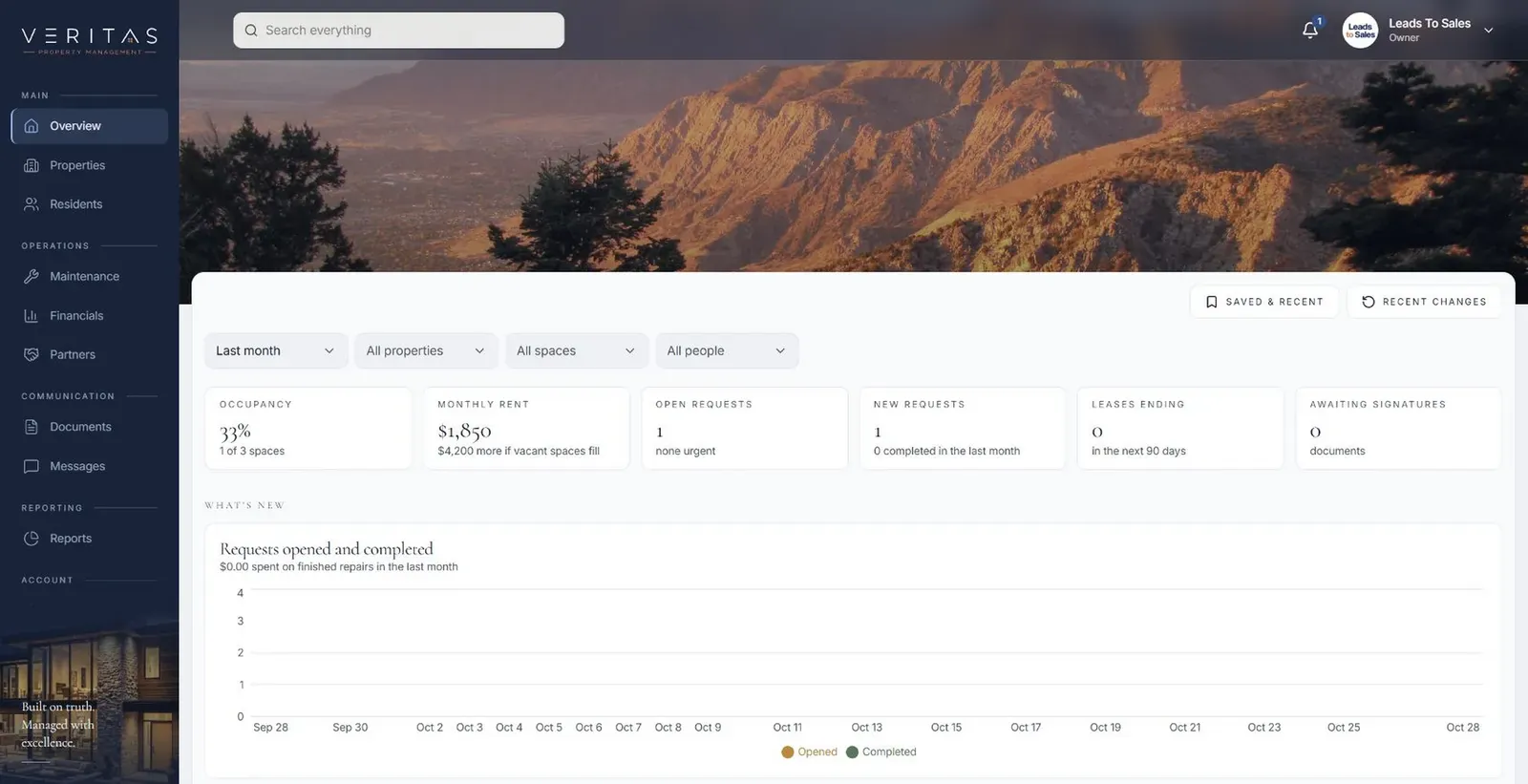
Our Veritas Property Management shows the kind of structure we aim for: tenant, owner and staff portals, with each maintenance request tracked through review, assignment, updates and closure. A modernized system should give you the same clarity, where every record has a status, an owner and a history.

your first release

What a first legacy software modernization release includes

A focused starting point, shaped with your team in Discovery and adjusted to how your Houston team works. Then we build on it.

  1. Discover
  2. Design
  3. Build
  4. Launch
  5. Optimize
Plan your first release →
release planLegacy Software Modernization · v1.0Ready to scope
  • Assessment with a wrap, replace or retire recommendation01
  • Plain-English record of the old system's business rules02
  • The first rebuilt function, tested by your staff03
  • Side-by-side run comparing old and new results04
  • Rehearsed data migration with a reconciliation report05
  • Hosting, backups and monitoring on supported foundations06
Then: connect more tools, add automation and AI as your team is ready.
in practice

What legacy software modernization looks like day to day

Illustrative scenarios, not client stories.

Engineering firm in The Woodlands

Consider an engineering firm in The Woodlands that tracks projects in a desktop database built in-house long ago. Projects and timesheets could move to a web system first while billing stays in the old tool. Once timesheet totals match in both systems across several billing runs, billing moves over and the desktop app is retired.

Build something like this →Every system is shaped around your own process.
faq

Legacy Software Modernization: questions we hear

Still unsure? Ask us directly.

What is legacy system modernization?

Legacy system modernization means moving business software off outdated technology onto current, supported foundations while keeping the rules and data the business depends on. It can mean wrapping an old system with an API, rebuilding it piece by piece, or migrating to a packaged product. The goal is software that is safe to change, connects to other tools and can be maintained by more than one person.

Do we have to switch everything at once?

No. We usually replace one part at a time, so the business keeps running and each change is small enough to undo. The new and old systems run side by side for each piece until their results match, and only then does that function switch over. A single big-bang cutover is the riskiest way to modernize, so we avoid it unless the system is truly small.

How do you make sure no data is lost in the migration?

We verify the migration with reconciliation, not hope. Before the real migration we rehearse it in a test environment, compare record counts and key totals between old and new, trace sample records with your staff, and list every rejected or changed record with a reason. The original data stays available read-only until you sign off on the result.

Can you work with code nobody understands anymore?

Yes. Undocumented code is the normal starting point for this kind of work. We read the code and database, watch how staff use the system, and compare what it does against what people believe it does. Then we document the business rules in plain English, so you can decide what to carry forward before anything is rebuilt.

When is it better to leave an old system alone?

Leaving an old system alone makes sense when it is stable, secure, rarely needs changes and isn't blocking anything. In that case a light integration or reporting layer may solve the real problem, and we'll say so after the assessment. Legacy system modernization is worth it when risk, missing features or dependence on one person starts costing your team time every week.

What happens to our team during the software migration?

During the move, your team keeps working in the systems they know until each new piece is ready. They test working software during the build, help confirm that results match, and get training before each switch. Because changes arrive in small pieces, people learn one new area at a time instead of an entirely new system overnight.

often built together

Legacy Software Modernization works best connected

Most teams start with one system and connect the next when they are ready. These are the services most often built alongside legacy software modernization, on the same record.

All services →
built by our team

See the pattern in a real system

Requests with photos, documents and history, moving from report to closure with every party seeing exactly what they need.

All highlighted work →
Veritas Property ManagementVeritas Property Management portfolio overview with properties, occupancy and requests In build · Residential property managementVeritas Property ManagementTenants, owners and staff connected around the same requests, records and updates.View the project →

Start with the problem. We'll build the possibility.

Tell us what slows your team down. We'll map it with you and suggest a useful first release, whether you're in Houston or anywhere in Greater Houston.