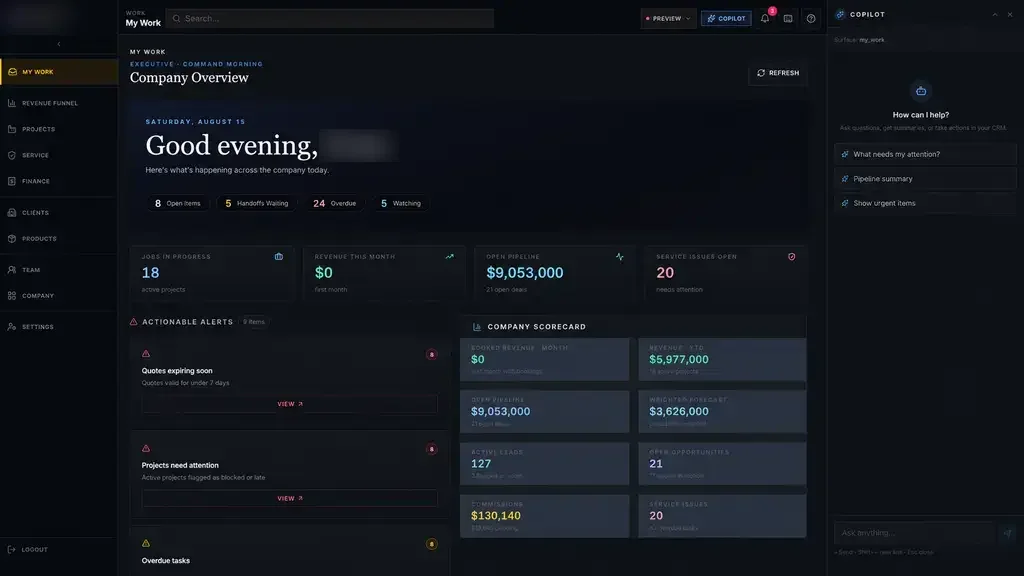
Many people call this a CMMS, short for computerized maintenance management system. Whatever the label, the job is the same: plan the work, do the work, record it and learn from it. We build that around your equipment, your crews and your rules, instead of asking your team to bend to a generic template.
Signs your maintenance process has outgrown spreadsheets
Maintenance often runs on a blend of paper work orders, a shared spreadsheet and the memory of a few senior technicians. That holds up until someone retires, an auditor asks for records, or a critical pump fails and nobody can say when it was last serviced.
In a region with as many plants, terminals and facilities as Greater Houston, from Pasadena and Baytown to the warehouses around the Port of Houston, downtime is costly and maintenance records get close scrutiny. The software has to make good records the easy path for technicians, rather than one more chore at the end of a shift.
- Preventive maintenance tracked on a wall calendar
- Work requests made by phone or in passing
- No history to check when a machine fails again
- Spare parts ordered only after the breakdown
- Records gathered by hand before every audit
Work orders and requests in maintenance management software
Every piece of work starts as a request or a scheduled task. Operators can report a problem from a phone or a shared terminal, with a photo and the asset it concerns. A planner reviews the request, sets a priority and assigns it, and the person who reported it can follow its status without walking over to the maintenance shop.
Technicians see their assigned work orders on a phone or tablet: the asset, the problem, safety notes, the procedure and the parts they will need. When the job is done they record time, parts, readings and what they found. That record stays with the asset for whoever works on it next.
Requests that are not really maintenance, like a dead light in an office, can be sorted to the right group, so the planner's queue stays focused on the equipment that keeps production running.
- 1 Request or task due
- 2 Planned and assigned
- 3 Work performed
- 4 Parts and time recorded
- 5 History updated
Preventive maintenance schedules that run themselves
Preventive maintenance is where a good system earns its keep. Schedules can follow calendar intervals, run hours, meter readings or cycle counts, and the system raises the work order when each one comes due. Planners see what is coming up, what is overdue and what was skipped.
Overdue work rises to the top instead of vanishing into a calendar. A supervisor sees the late inspection, the asset it belongs to and who owns it, and can reschedule or reassign it from the same screen. It is the same manage-by-exception idea behind our Industrial Operations Platform for a private industrial company: leaders look at what is off track, not at every single task.
- Calendar, meter and run-hour triggers
- Procedures and checklists attached to each task
- Overdue and skipped work flagged with an owner
- Planning for seasonal work and shutdowns
✕Preventive tasks on a wall calendar
✓Schedules that raise work orders when each task is due
✕Requests shouted across the shop floor
✓Requests logged from a phone with a photo and an asset
✕Repair history in a senior tech's memory
✓Every work order stored against the asset
✕Spare parts ordered after the breakdown
✓Reorder requests raised when stock runs low
✕Binders assembled before each audit
✓Records exported from one time-stamped history
Asset records and spare parts
Each asset gets its own record: location, make and model, serial number, manuals, warranty details and every work order ever done on it. Assets can be organized by site, area and system, so a technician finds the right pump in the right unit without guessing.
Spare parts connect to the assets that use them. When a work order consumes a part, stock goes down. When stock falls below the level you set, purchasing gets a request. Critical spares can carry a flag, so the team is never stuck waiting on a part that should have been on the shelf.
Equipment also moves. When a motor goes out for rebuild and comes back to a different line, its history travels with it, so nobody mistakes a rebuilt unit for a new one or loses track of what was done in the shop.
Records for audits, safety and leadership
Many Houston operations face inspections, insurance reviews or customer audits that lean on maintenance records. Maintenance management software built for a Houston site keeps a time-stamped history of who did what and when, with signatures and attachments where you need them. Records come out of the system instead of being pieced together from binders.
For regulated environments, we have built advanced audit trails and full systems for FDA-regulated work under 21 CFR Part 11. Not every plant needs that level of control, but the same discipline, with role-based access, encryption, multi-factor sign-in and monitoring, is there when you do.
Leaders get a clear picture without building reports by hand: open work by priority, preventive completion, repeat failures by asset and backlog by crew. Where your ERP, plant historian or accounting system holds related data, we connect where the vendor's APIs or integration options allow.
The system handles
- Creating preventive work orders
- Flagging overdue tasks
- Reorder alerts for spare parts
Your people decide
- Prioritizing repairs
- Diagnosing failures
- Planning shutdowns
How we build maintenance management software with your team
Our process has five steps: Discover, Design, Build, Launch and Optimize. During Discovery we walk the site with your planners and technicians, review recent work orders and look at what records already exist. Design turns that into screens your crews can try before code is written.
The first release is deliberately narrow, often work orders and preventive maintenance for one area or one site. Your team tests working software during Build with real assets. We help load your current equipment lists and history, you own the code and data, and the system extends to more areas once your team relies on it.
After Launch, the Optimize step looks at what the records are telling you: which assets fail most, which preventive tasks never find anything, and where a schedule could be tightened or relaxed.