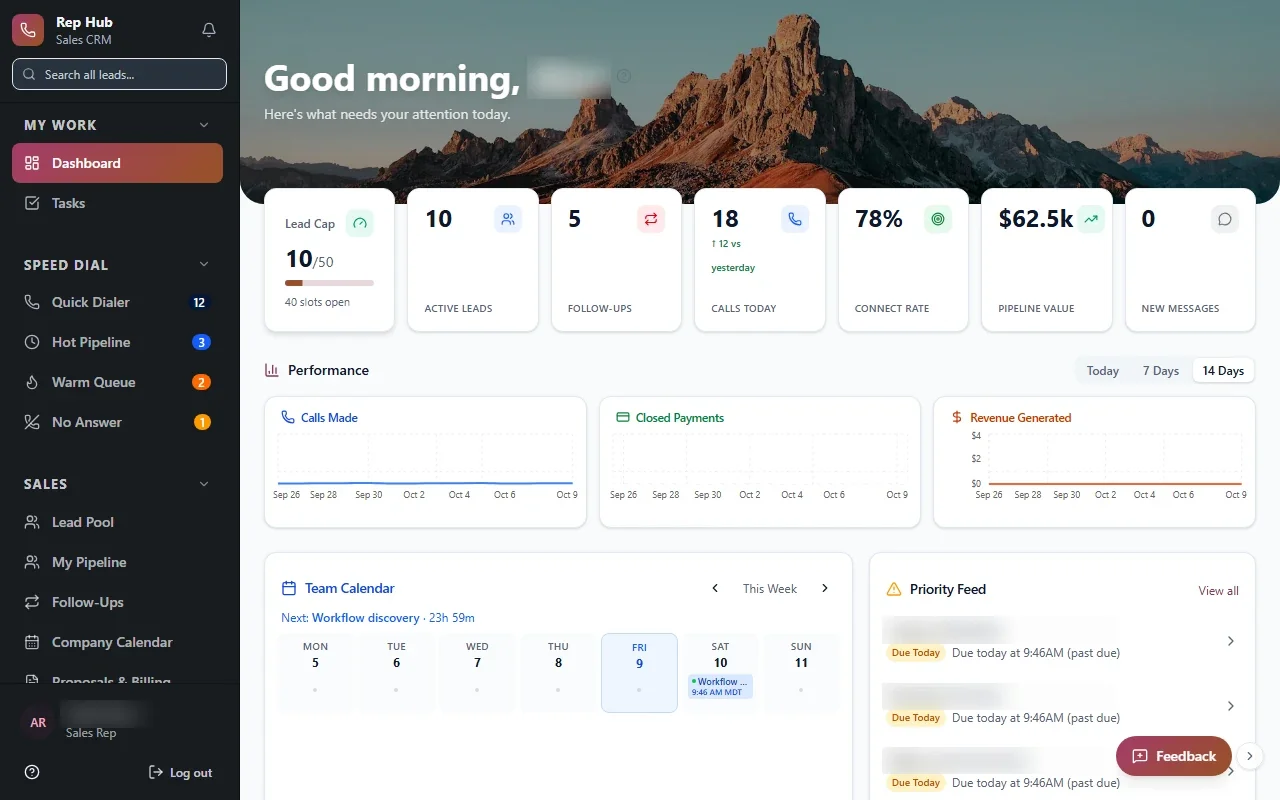
Sales is one of our three specialties. This page is about the selling itself: leads, calls, follow-ups, proposals and the moment a deal becomes work for someone else. If you are after a broader system that runs the business after the sale, our custom CRM page covers that side in more depth.
Why reps avoid the CRM they already have
Most sales teams do not really have a CRM problem. They have a data entry problem. Reps are asked to fill in fields that help someone else, on screens designed for a different kind of sale, while the details they actually need are scattered across email, texts and a notebook on the passenger seat.
So the CRM turns into a reporting chore. Reps update it right before the weekly meeting, managers stop trusting the numbers, and the forecast becomes a round of phone calls. The fix is a system that gives reps something useful back every single time they open it.
- Stages that do not match how deals really move
- Fields filled in only for the weekly meeting
- Follow-ups tracked on sticky notes
- Proposals built in a separate tool
- Managers rebuilding the pipeline in spreadsheets
Sales CRM software built around your sales motion
Custom sales CRM software for a Houston team starts with how your deals actually move. A company selling commercial roofing, an industrial supply distributor and a door-to-door solar crew all sell in very different ways. Their stages, required fields and handoffs should differ too.
We define the stages your deals pass through and what has to be true before a deal moves forward. A deal might not reach proposal until a site visit is logged, or close until a signed contract is attached. Rules like these keep the pipeline honest without a manager policing every record.
For field reps, the same workspace runs on a phone. A rep finishing a visit in Katy can log the conversation, attach a photo and set the next appointment before starting the truck, and managers see that activity as soon as it is saved.
Each rep opens the CRM to a workspace rather than a database: today's calls, overdue follow-ups, fresh leads and deals waiting on the customer. Logging an activity takes a tap, and the system suggests the next step before the rep leaves the screen.
- 1 Lead arrives
- 2 Routed to a rep
- 3 Worked and followed up
- 4 Proposal and contract
- 5 Handed to delivery
Follow-ups, reminders and AI-drafted next steps
Deals are lost to silence far more often than to a firm no. The CRM can create a follow-up task after every call, nudge a rep when a proposal has gone unanswered, and route new leads to the right person by territory, product or source.
AI helps where it saves genuine effort: summarizing a call, drafting a follow-up email for the rep to edit, or pulling the key details out of an inbound inquiry. The rep reviews and sends. Nothing reaches a customer without a person approving it first.
- Lead routing by territory, product or source
- Follow-up tasks created after each activity
- Reminders on proposals with no reply
- Email and texts logged against the deal
✕Generic stages that do not fit your deals
✓Stages and rules shaped around your real sales process
✕Reps update the CRM before the weekly meeting
✓Activity logged in a tap as reps work
✕Follow-ups remembered or forgotten
✓Follow-up tasks created after every call
✕Managers rebuild the pipeline in spreadsheets
✓Live pipeline and forecast views by rep and team
✕Delivery restarts the story after the sale
✓Signed deals hand off with every detail attached
What Rep Hub shows about connected sales software
Rep Hub is a sales platform we built. Recruiting, training, each rep's daily workspace and the contracts they close all share one system there. Once a customer has both signed and paid, delivery and commissions kick off from that event, so nobody retypes what was sold.
The lesson applies to any sales CRM: the record should keep working after the deal closes. When the people delivering the work and the people paying commissions see the same deal the rep sold, most arguments about what was promised simply stop happening.
Manager views, forecasting and coaching
Managers need different screens from reps. They want pipeline by rep and stage, activity against goals, deals parked too long in one stage, and a forecast they can defend upstairs. In sales CRM software designed for Houston sales managers, those views refresh as reps work, so the weekly meeting starts from current numbers.
Coaching gets easier once the data is real. A manager can open a rep's week, see the calls and proposals behind the totals and pick one deal to talk through together. Leaderboards and contests can sit on top of the same data if they suit your culture.
We connect the CRM to your email, phone system, e-signature, accounting or marketing tools where the vendor's APIs or integration options allow, so activity lands in the CRM without anyone entering it twice.
When a deal closes, the CRM should hand the work to whoever delivers it. Operations receives the signed contract, the scope, the contacts and any promises the rep made in a single record, so the customer never has to explain everything a second time.
The system handles
- Lead routing
- Follow-up reminders
- Logging email and calls
Your people decide
- Customer conversations
- Pricing decisions
- Coaching reps
How we build a sales CRM with your team
We follow five steps: Discover, Design, Build, Launch, Optimize. In Discovery we spend time beside your reps and managers and review recent deals, both the ones that closed and the ones that slipped away. Design produces screens your reps can try before we write code, which is where most bad ideas get caught cheaply.
We launch a focused first release, often the pipeline and rep workspace for a single team, and your reps test working software during Build. We move your existing contacts and deal history across and check it with you. After Launch we watch how reps really use the system and trim what they skip, since a field nobody fills in is usually a field nobody needs. The code and the data belong to you.