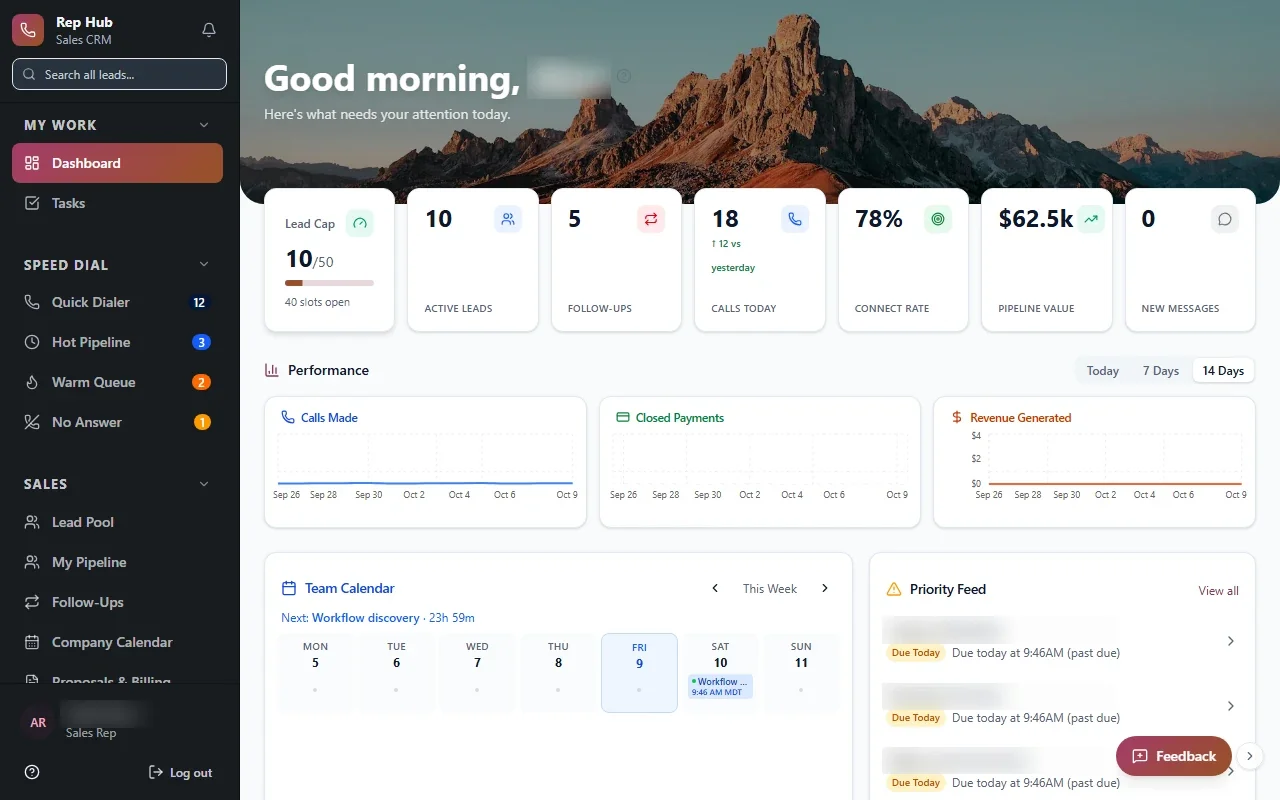
Bayou Thread Systems builds sales training software for Houston sales organizations that want one path from applicant to certified rep. Managers see who is progressing and who is stuck, and reps get access to selling tools only after they have shown they are ready.
Why new reps take so long to ramp
Most sales teams onboard in pieces. Applicants come through a job board, paperwork goes by email, training videos sit in one app and the CRM sits in another. A new rep has to learn four tools before they can learn the job.
Managers feel it too. They cannot easily tell which recruits finished their paperwork, who watched the product lessons or who is ready to ride along. So they ask in group chats and fill the gaps from memory.
The cost shows up later. A rep who never really learned the pricing rules quotes the wrong number, a customer cancels, and the commission gets clawed back. Most of those problems trace back to onboarding that nobody could see.
- Applicants drop off between the interview and the first day
- Training content no longer matches what the team actually sells
- Reps start selling before they have shown they know the offer
- Managers cannot see progress without asking each rep in turn
From applicant to first day in one record
We start the record at the application. Each candidate moves through stages your team defines, such as applied, interviewed, offered and onboarding, with a named recruiter responsible at each one.
When a candidate accepts, onboarding begins on that same record. Required documents, agreements and account setup appear as tasks, and the new rep can see exactly what is left. Nothing gets retyped from an applicant file into a separate training system.
This is the pattern behind Rep Hub, the platform we built for a sales organization. Recruiting and training connect straight into the rep workspace, so the person a recruiter hired is the same person a manager coaches and the same person who later earns commission.
- 1 Applicant hired
- 2 Onboarding tasks
- 3 Training path
- 4 Certified
- 5 Selling opens
Training paths built around your offer
Generic courses teach generic selling, and reps can tell. We build training paths around what your reps actually say and do: your products, your pricing rules, your common objections and your compliance requirements.
A path can mix short lessons, videos you record, written scripts, quizzes and practice tasks. Each step can depend on the one before it, so a rep cannot skip to pricing before they understand the product. Trainers edit a lesson once and every rep on that path sees the new version.
For Houston teams selling in several markets or in more than one language, paths can vary by role, region or product line while sharing the same core lessons.
✕Applicants tracked in a job board and a spreadsheet
✓Applicants move through stages with a named recruiter
✕Training videos live in a separate app nobody checks
✓Lessons sit inside the platform reps sell from
✕Reps start quoting before they know the pricing rules
✓Selling tools open once certification is passed
✕Managers ask in group chats who finished training
✓One view shows every new rep's progress by stage
✕Updated scripts reach some reps and not others
✓One lesson edit reaches every rep on that path
Certification before a rep sells
For many Houston teams, the most useful rule in sales training software is also the simplest: a rep cannot quote or sign customers until they have passed the steps that matter. We build that gate directly into the platform.
Certification can include a quiz score, a recorded pitch reviewed by a manager, a completed ride-along or a signed acknowledgment. Each requirement is recorded with the date and the person who approved it, which helps when a customer complaint or a compliance question comes up later. Once the requirements are met, selling tools open automatically. If an offer or rule changes, affected reps can be asked to recertify before they carry on.
- Quizzes and knowledge checks on products and pricing
- Recorded pitches reviewed and scored by a manager
- Ride-along or shadowing sign-off from a field trainer
- Acknowledgment of compliance rules and approved scripts
What managers and trainers see
A trainer opens one view and sees every new rep by stage: who is waiting on paperwork, who is halfway through a path, who failed a quiz twice and who is ready for review. The next action for each person is obvious, and reminders go out on their own when a rep has not opened a lesson in a while.
Over time, the same records help you improve the program, which is where sales training software built for your Houston team pays off. If many reps stall on the same lesson, that lesson probably needs work. If certified reps struggle with one objection in the field, the topic can be added to the path. A sales director near the Galleria and a field trainer in Pearland look at the same numbers.
The system handles
- Assigning onboarding tasks
- Reminders for unfinished lessons
- Opening tools after certification
Your people decide
- Interviewing candidates
- Reviewing recorded pitches
- Field coaching
How we build a training platform
Projects move through Discover, Design, Build, Launch and Optimize. During Discover we follow a recent hire from application to first sale and note where they waited, got confused or dropped out. The first release usually covers the stretch where reps are lost most often.
Your trainers write and own the content; we build the structure that delivers it, tracks it and connects it to selling. Links to your CRM, e-signature, HR or payroll tools are built where the vendor's APIs or integration options allow. A few current reps test the working paths during Build, and the code and data are yours when we finish.
After launch, trainers usually keep adjusting. A lesson gets shorter, a quiz question gets clearer, a new product line needs its own path. Those changes are part of Optimize, and most of them can be made by your own team without waiting on a developer.