Bayou Thread Systems builds custom CRM software for Houston companies whose customer work keeps going after the contract is signed. We shape the records, stages and rules around your process, then connect the sale to onboarding, delivery, billing and the people who earn credit for it.
Should your Houston business build a custom CRM or buy one?
Often you should buy. Popular CRMs are mature, well supported and a good fit for a standard sales pipeline. If your team sells one way, closes deals and hands them to finance, a subscription and some configuration may be all you need. We will say so.
Building makes sense when the product keeps fighting your process. These are the situations where we usually recommend it, and if only one of them applies, configuration may still be the better answer:
- Your process has stages, approvals or relationships the CRM cannot model without hacks.
- The CRM needs to start delivery work, not only record that a deal closed.
- Sales, delivery and finance each keep their own copy of the customer.
- You pay for seats and add-ons that people avoid using.
- You want to own the system and its data outright.
What happens after Closed Won
Most CRMs treat a signed deal as the finish line. For the rest of your company, it is the starting gun. Someone has to schedule the work, order materials, set up the account and tell the customer what happens next, and that information usually travels by email.
Our Industrial Operations Platform was built around this gap. Its summary line is simple: "Most CRMs stop at Closed Won. This one starts there." A won quote moves into engineering, purchasing, production, shipping and installation as recorded changes of state, and leadership sees exceptions with an owner and a next action. A custom CRM for a Houston contractor, distributor or manufacturer can carry that same thread, so the details of the sale are never retyped by the next team.
In practice that means the record a rep fills in during the sale becomes the starting point for everyone after them. The project manager sees the scope that was sold, purchasing sees the materials, and the customer gets a clear next step instead of silence while teams catch up.
- 1 Lead
- 2 Conversation
- 3 Proposal
- 4 Signed and paid
- 5 Delivered
Rep Hub: one system from recruit to commission
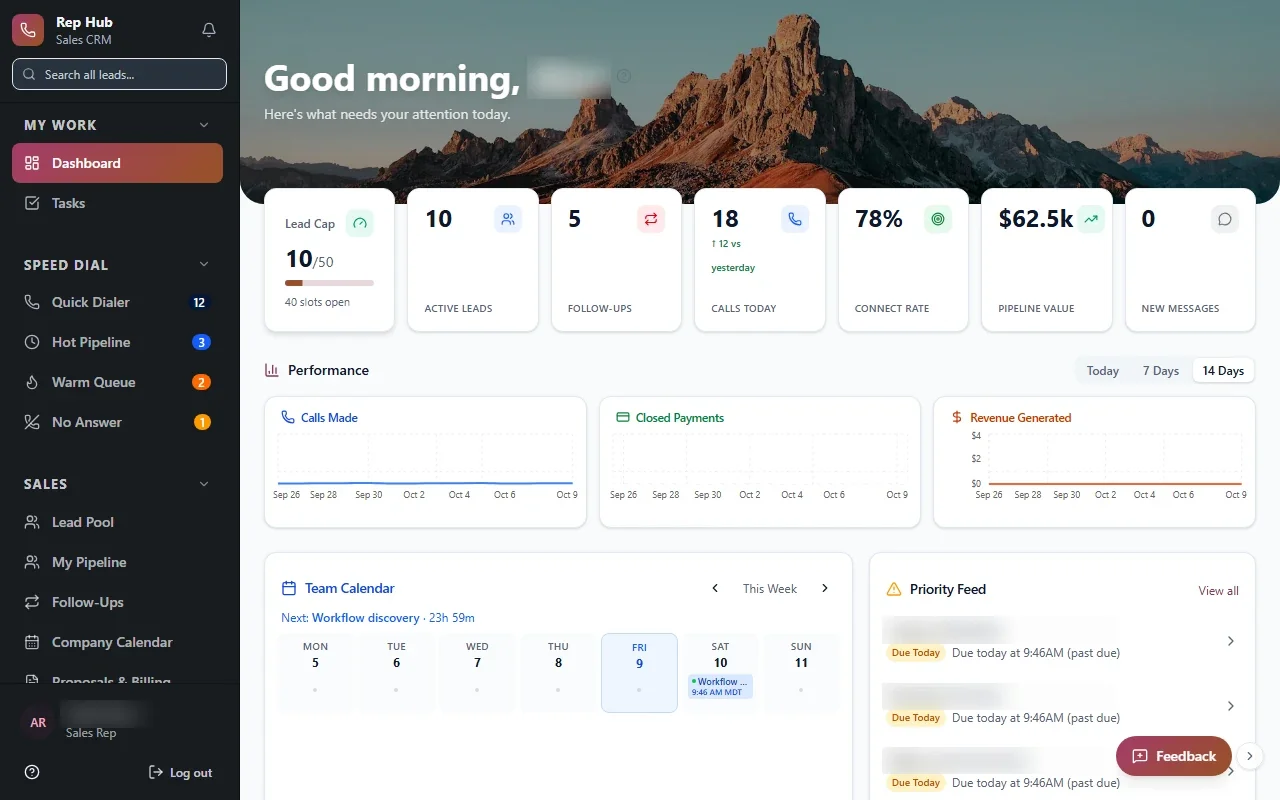
Rep Hub is a sales organization platform we built. It started from a practical problem: new reps learned the job in one place, worked customers in another, and handed signed deals to people who had to piece together what was sold.
Rep Hub connects recruiting and training to a daily rep workspace with leads, calls, follow-ups, proposals and contracts. When a contract is signed and paid, activation and delivery work start automatically with the customer's details attached. Commissions connect the commercial work back to the people involved. Reps, managers, administrators and delivery teams each get a view built for their part of the job.
The lesson carries to other sales teams. When recruiting, selling, delivery and pay live in one system, managers stop reconciling spreadsheets at month end and reps can see exactly how a deal turned into their commission.
✕Fields renamed to mean something they were never built for
✓Fields and stages named for your actual process
✕A long handoff email every time a deal closes
✓A closed deal starts delivery work automatically
✕A spreadsheet kept beside the pipeline
✓Everything the team tracks lives on the customer record
✕Commissions worked out by hand each month
✓Commissions tied to the deals that were signed and paid
✕Finance and delivery keep separate customer copies
✓Every team reads one shared customer record
Business management software around one customer record
Once the CRM is the place where the customer lives, other work can hang from it. That is where CRM development turns into business management software: quoting, scheduling, service history, renewals and account health all read from the same record instead of keeping their own copies.
We add those pieces in the order that saves your team the most effort. A Houston contractor might start with quotes and job handoffs. A professional services firm might start with engagements and renewals. Each addition uses the same customer, contacts and history, so reporting finally agrees across departments.
Medical practice management software for the administrative side
Healthcare administration is our specialty, and practices have relationship work that a generic CRM handles poorly. Referring providers, outreach, intake, authorizations and scheduling handoffs all need an owner and a status. We build medical practice management software for that administrative work, designed for full HIPAA compliance with role-based access and audit logs.
Your EHR stays the clinical record, and billing usually stays in the systems built for it. We connect to them where the vendor's APIs or integration options allow, and clinical decisions always stay with clinicians. For a specialty group near the Texas Medical Center, a Houston custom CRM of this kind might show which referring offices send the most patients and which referrals are still waiting on paperwork.
The system handles
- Logging activity
- Creating onboarding tasks
- Calculating commissions
Your people decide
- Building relationships
- Pricing decisions
- Coaching the team
Moving your customer history without losing it
Your current CRM, spreadsheets and inboxes hold years of useful history. We map those records to the new structure, remove duplicates, and bring across contacts, notes, deals and documents so your team starts with everything they had.
We run a trial migration first and have your team check familiar accounts before the real cutover. Anything that cannot map cleanly is listed for a person to decide, not quietly dropped.
We also look at what should not come across. Old test records, contacts nobody has spoken to in a long time and half-finished fields can be archived instead of cluttering the new system. You decide what stays, and the archive remains yours.
How a CRM development project runs
We work through Discover, Design, Build, Launch and Optimize. In Discover we follow a real customer from first contact to delivered work and mark every handoff. That map decides what the first release covers, usually the part of the journey where information gets lost most often.
During Build your team sees and tests working software, so reps and managers shape the screens they will use every day. After launch we keep refining as the process changes. You own the code and the data, and you can take both with you.