We build the schedule around real constraints: work center capacity, shifts, material on hand, drawings released and the delivery date promised to the customer. When something changes, the people affected see it, and the planner sees what moves as a result. Nobody has to reprint the plan and walk it out to the floor.
Why the schedule is wrong by Tuesday
Most shops have a plan on Monday morning. By midweek a rush order has jumped the line, a weld procedure is waiting on approval, a plate shipment is late and one machine is down for repairs. The planner rebuilds the spreadsheet, prints it, and the floor works from a copy that is already out of date.
The problem is rarely the planner. It is that the schedule lives apart from the information that changes it. Purchasing knows the material is late. Engineering knows the drawing has a revision pending. Maintenance knows the brake press is down. None of that reaches the schedule until someone walks over and says so.
- Schedules kept in spreadsheets or on a whiteboard
- Rush orders inserted without seeing what they push back
- Jobs started before material or drawings are ready
- Floor status reported by walking around and asking
Capacity by work center, shift and skill
Each job follows a routing: cut, form, weld, machine, coat, inspect, ship. Each step needs a work center and often a person with a specific qualification. We model those steps with the time your shop actually takes, then lay jobs onto the calendar by shift.
The planner sees load by work center for the coming days and weeks. An overloaded weld bay shows up as a problem before it becomes overtime. When a certified welder is out, the schedule shows which jobs need someone else qualified. Planners keep the final say and can drag a job to a new slot, while the software shows the downstream effect before they commit.
- 1 Order received
- 2 Readiness checked
- 3 Slot scheduled
- 4 Work started
- 5 Step completed
Readiness checks before a job reaches the floor
A scheduled job that cannot start wastes a slot and a crew. So we add readiness checks to each job: material received, drawings released, tooling available, customer approvals in hand. A job that fails a check stays on the plan but is marked not ready, with the reason and the person who owns the fix.
This is where production scheduling software pays off for Houston manufacturers who juggle purchased material and customer drawings. The planner fills the next shift with jobs that are actually ready, and the not ready list becomes a daily to-do list for purchasing and engineering.
- Material received or allocated from stock
- Current drawing revision released to the floor
- Tooling, fixtures and programs available
- Customer approvals and inspection holds cleared
✕The schedule is a spreadsheet rebuilt every few days
✓A live schedule based on routings, capacity and shifts
✕Rush orders jump the line with unknown side effects
✓Draft changes show which jobs slip before anyone commits
✕Jobs start and stall waiting on material or drawings
✓Readiness checks hold back jobs that cannot finish
✕Supervisors walk the floor to learn job status
✓Operators tap start and finish, and status updates everywhere
✕A machine breakdown means rebuilding the plan by hand
✓Mark a work center down and see proposed moves
Rush orders, breakdowns and what-if planning
Change is normal in a job shop. The goal is to make each change visible and deliberate. When a customer asks for an expedite, the planner can try it in a draft schedule and see which other jobs slip, by how much, and whose delivery dates are at risk.
If the answer is acceptable, the planner publishes it and the affected leads are notified. If it is not, sales gets a clear picture to take back to the customer. Machine breakdowns work the same way: mark a work center down, and the software proposes where its jobs could go.
Every published version is kept. If a customer later asks why their order moved, you can see when the change was made, who approved it and which expedite caused it. That history also shows which kinds of disruption hit your shop most often, which is useful when you plan capacity for the next year.
A floor view that updates itself
Supervisors and operators see their own queue on a shop floor tablet or a screen at the work center: what is next, what is ready, and what is waiting. Starting and finishing a step takes a tap, and a problem can be raised with a photo and a reason.
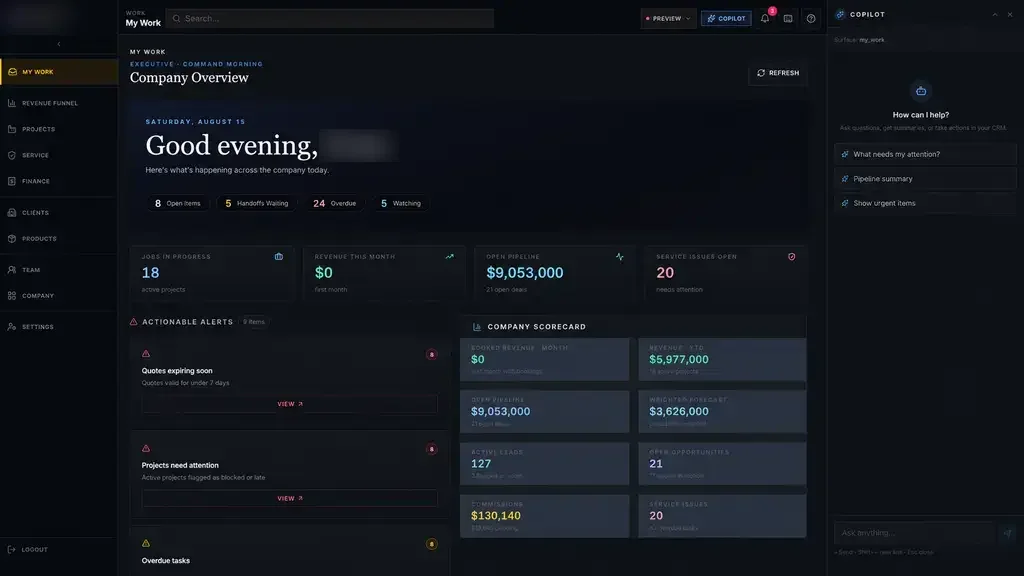
Those updates feed straight back into the schedule. Leaders stop asking for status and start managing exceptions. That idea also drives our Industrial Operations Platform, a quote-to-service operating system we built for a private industrial company, where leaders manage by exception instead of chasing updates. The view on the office screen matches what is happening at the machine.
The system handles
- Recalculating load after changes
- Flagging jobs that are not ready
- Notifying leads of a published change
Your people decide
- Approving expedites
- Choosing between conflicting due dates
- Assigning qualified crew
Working with your ERP, and where to start
Many shops keep their ERP for orders, inventory and accounting. Our production scheduling software can sit beside it, pulling sales orders and material status and sending completions back, where the vendor's APIs or integration options allow. Where your ERP has no usable interface, scheduled exports and imports are often enough to begin.
Projects move through Discover, Design, Build, Launch, Optimize. Discovery happens on your floor, with your planner and leads. The first release is focused, for example one department or one product family, and your team uses working software during Build. Once it holds up against a real week, we extend it across the plant. You own the code and data.